Sources
Browse and follow regulatory institutions and bodies from Carver's global monitoring network.
Overview
The Sources page is where you manage which regulatory bodies you track. Carver monitors over 1,000 institutions worldwide — including national regulators, international standard-setting bodies, and enforcement agencies. You subscribe to a subset of these to focus your Signals and Dashboard on what's relevant to you.
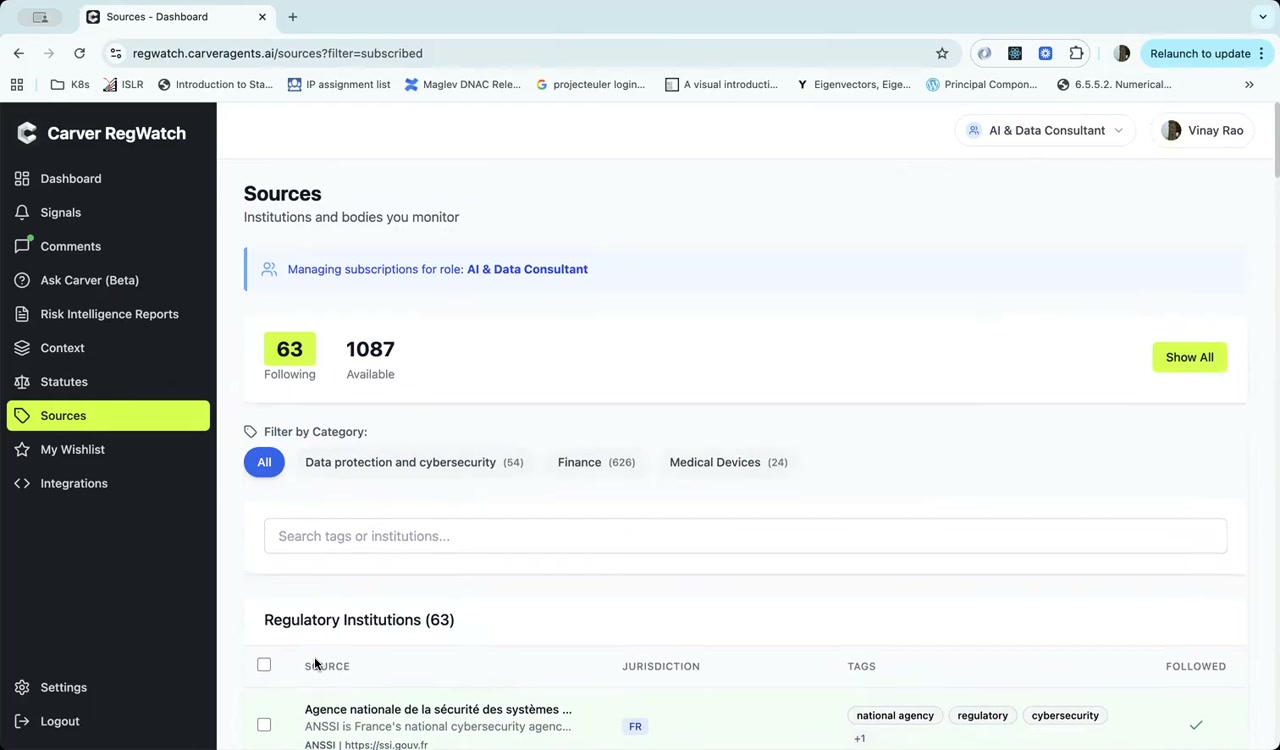
Following and Available Sources
At the top of the page you'll see two numbers:
- Following — the number of sources you're currently subscribed to under your active role
- Available — the total number of sources in Carver's network
Click Show All to expand from your current subscriptions to the full catalog.
Filtering by Category
Use the Filter by Category buttons to narrow the source list by regulatory domain:
- Data protection and cybersecurity
- Finance
- Medical Devices
- (additional categories available)
Click All to clear the filter and see every source you follow (or all available sources, if in "Show All" mode).
Searching Sources
Use the search bar to find a specific institution by name or tag. Results update as you type.
The Sources Table
The institution list shows each source with:
| Column | Description |
|---|---|
| Source | Institution name, description, and website |
| Jurisdiction | Country or region code (e.g., FR, US, EU) |
| Tags | Topic tags like national agency, regulatory, cybersecurity |
| Followed | Checkmark if you are currently subscribed |
Subscribing to a Source
Click a source row or its follow toggle to subscribe. Once subscribed, new items from that institution will appear in your Signals feed and may surface in your Dashboard's Notable Changes.
Role-scoped subscriptions
Subscriptions are managed per role. Following a source while viewing as "AI & Data Consultant" only affects that role's feed — it does not automatically add the source for other roles in your organization.
Managing Subscriptions in Bulk
Select multiple sources using the checkboxes and use the bulk action menu to follow or unfollow them in one step.