Signals
A real-time feed of every regulatory change detected across your tracked sources.
Overview
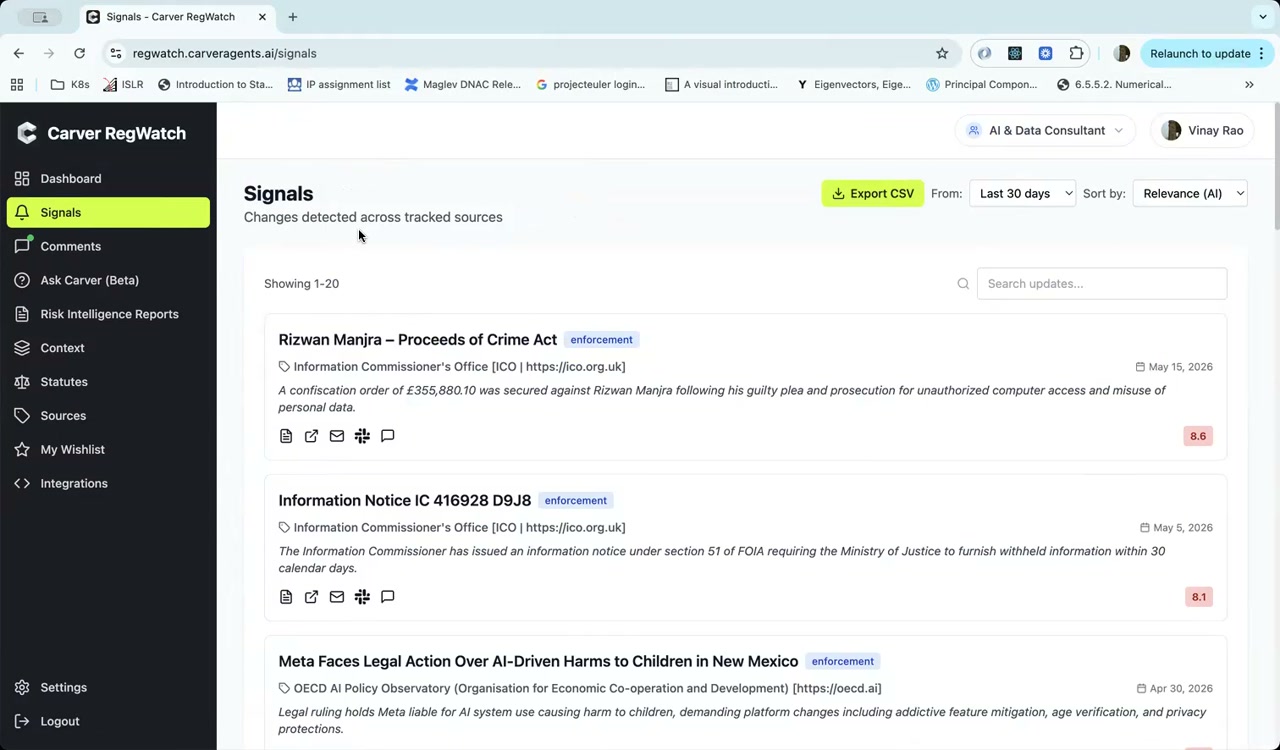
The Signals page shows all changes detected across the regulatory bodies you follow, ordered by relevance to your current role. Unlike the Dashboard (which highlights the most notable items), Signals gives you the complete, unfiltered list.
Reading the Signals Feed
Each signal card shows:
- Title — the regulatory update's headline
- Source — the issuing institution and its URL
- Date — when the update was published
- Summary — a one-sentence AI-generated description
- Relevance score (0–10, shown in the bottom-right corner) — higher scores indicate closer alignment with your role's focus areas
- Update type tag — e.g.,
enforcement,guidance,consultation
Sorting and Date Range
Use the controls in the top-right to adjust what you see:
- From — choose your lookback window: Last 7 days, Last 30 days, Last 90 days, All time
- Sort by —
Relevance (AI)ranks items by how closely they match your role's focus;Dateshows newest first
Search
Use the search bar to find specific signals by keyword. Search applies to titles and AI-generated summaries.
Actions on Each Signal
Every signal card has a row of action icons:
| Icon | Action |
|---|---|
| Document | Open full detail view |
| External link | Open original source URL |
| Envelope | Email this signal |
| Slack | Send to a Slack channel |
| Comment | Add an internal comment |
Exporting Signals
Click Export CSV to download the current filtered view as a spreadsheet. The export includes titles, sources, dates, summaries, and relevance scores.
Signal Detail
Clicking a signal opens the same detail panel available from the Dashboard — see Signal Detail for a full description of the fields.