Context
Tell Carver about your organization and regulatory focus so it can score and prioritize signals accurately.
Overview
The Context page stores information about who you are and what you care about. Carver uses this to calculate relevance scores for signals and to generate role-specific Risk Intelligence Reports tailored to your business.
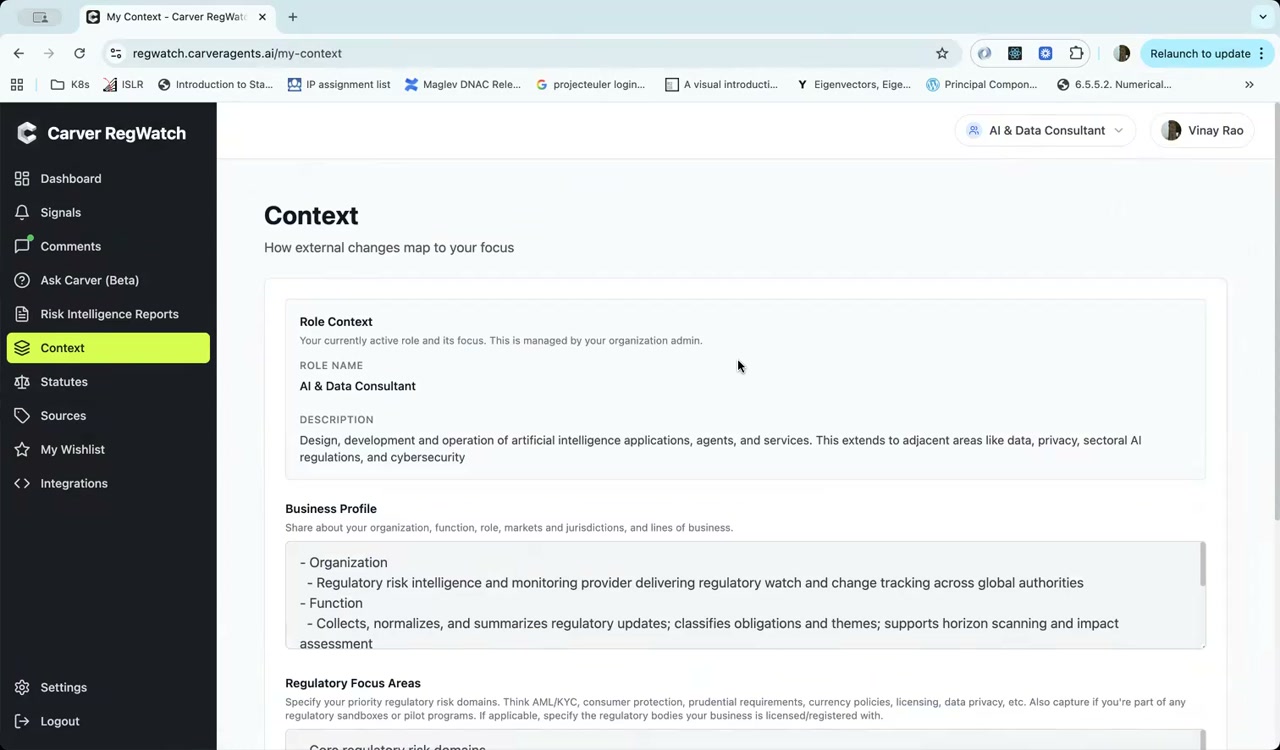
Role Context
The Role Context section shows the regulatory role currently active for your account. This is set by your organization administrator and defines your default regulatory focus.
| Field | Description |
|---|---|
| Role Name | Your active role (e.g., "AI & Data Consultant", "Legal") |
| Description | What this role covers — the regulatory domains and functions it represents |
To change your active role, use the role selector in the top-right of any page. To update a role's definition (name, description, or assigned sources), contact your organization administrator.
Business Profile
The Business Profile field is a free-text description of your organization. Include:
- Organization type — what your firm does
- Function — how your team uses regulatory intelligence
- Markets and jurisdictions — where you operate
- Lines of business — products or services affected by regulation
Carver uses this profile when generating Risk Intelligence Reports and when calculating how closely a regulation maps to your operations.
Example profile:
- Organization
  - Regulatory risk intelligence provider delivering watch services across global authorities
- Function
  - Collects, normalizes, and summarizes regulatory updates; classifies obligations and themes;
    supports horizon scanning and impact assessment
- Markets
  - EU, US, UK, APAC
Regulatory Focus Areas
The Regulatory Focus Areas section lets you specify the regulatory risk domains your organization prioritizes. Examples include:
- AML/KYC
- Consumer protection
- Prudential requirements
- Currency policies
- Licensing
- Data privacy
- AI governance
You can also list specific regulatory bodies you're licensed with or registered under, which helps Carver surface enforcement actions from those bodies at higher relevance.
How Context Affects Your Experience
| Feature | How Context is used |
|---|---|
| Relevance scores | Signals are scored 0–10 based on alignment with your Business Profile and Focus Areas |
| Notable Changes | Dashboard highlights signals with the highest relevance to your context |
| Risk Intelligence Reports | Reports are generated for your specific role and focus areas |
| Ask Carver | The AI assistant uses your context to frame answers to your questions |
Tip
The more specific your Business Profile and Regulatory Focus Areas, the more accurate Carver's relevance scoring becomes. Vague profiles lead to lower-quality signal prioritization.